
Dispatch the right truck
See which unit is closest, available and appropriate for the job instead of calling drivers or guessing from a whiteboard.
- Live truck and driver visibility
- Faster nearest-unit decisions
- Route progress after dispatch
Live truck availability, PTO and hydraulic-use records, roadside and loading cameras, driver safety and a complete pickup-to-handover evidence chain — connected to the dispatch workflow you already use.
What towing companies actually need
A useful system must help controllers send the right unit, help operators work safely and give the business a defensible record of where the vehicle went, when the equipment worked and what happened on scene.
See which unit is closest, available and appropriate for the job instead of calling drivers or guessing from a whiteboard.
Build a timestamped record from dispatch through arrival, recovery, departure and handover for insurer and commercial work.
Track PTO engagement and duration so hydraulic servicing follows actual recovery work rather than vehicle mileage alone.
Use road, driver and loading-area cameras to verify what happened when GPS and a PTO event cannot tell the full story.
Give controllers visibility over lone workers operating at night, on high-speed roads and in higher-risk recovery environments.
Connect pickup, transport and yard or repairer arrival into a single record that helps resolve damage, destination and release disputes.
The evidence chain
The strongest record is not one GPS point or one sensor event. It is the connected sequence of assignment, response, arrival, equipment use, transport and handover.
Important distinction
PTO activity confirms hydraulic or auxiliary equipment operation. It does not, by itself, prove that a specific vehicle was attached or loaded. Camera context and the dispatch record complete that proof.
Dispatch
Reference, pickup, destination and required truck type enter the operator's dispatch workflow.
Respond
Controllers see the assigned unit moving toward the scene and can share progress through the existing customer workflow.
Arrive
Arrival is anchored to time and location, with road and driver cameras available when the situation needs visual verification.
Recover
PTO activity records hydraulic work; the loading camera adds the context needed to see the actual recovery.
Handover
The route, destination arrival and available footage complete the custody timeline for the job record.
PTO and equipment-use monitoring
A correctly fitted input can record when the PTO or selected hydraulic circuit engages, where it happened and how long it remained active. This creates an equipment-use record alongside normal mileage and engine hours.
What it can show
What needs more context
Input design varies by truck. We may read an available PTO circuit or fit a suitable industrial position sensor. Separate functions require separate inputs where the vehicle and tracker support them.
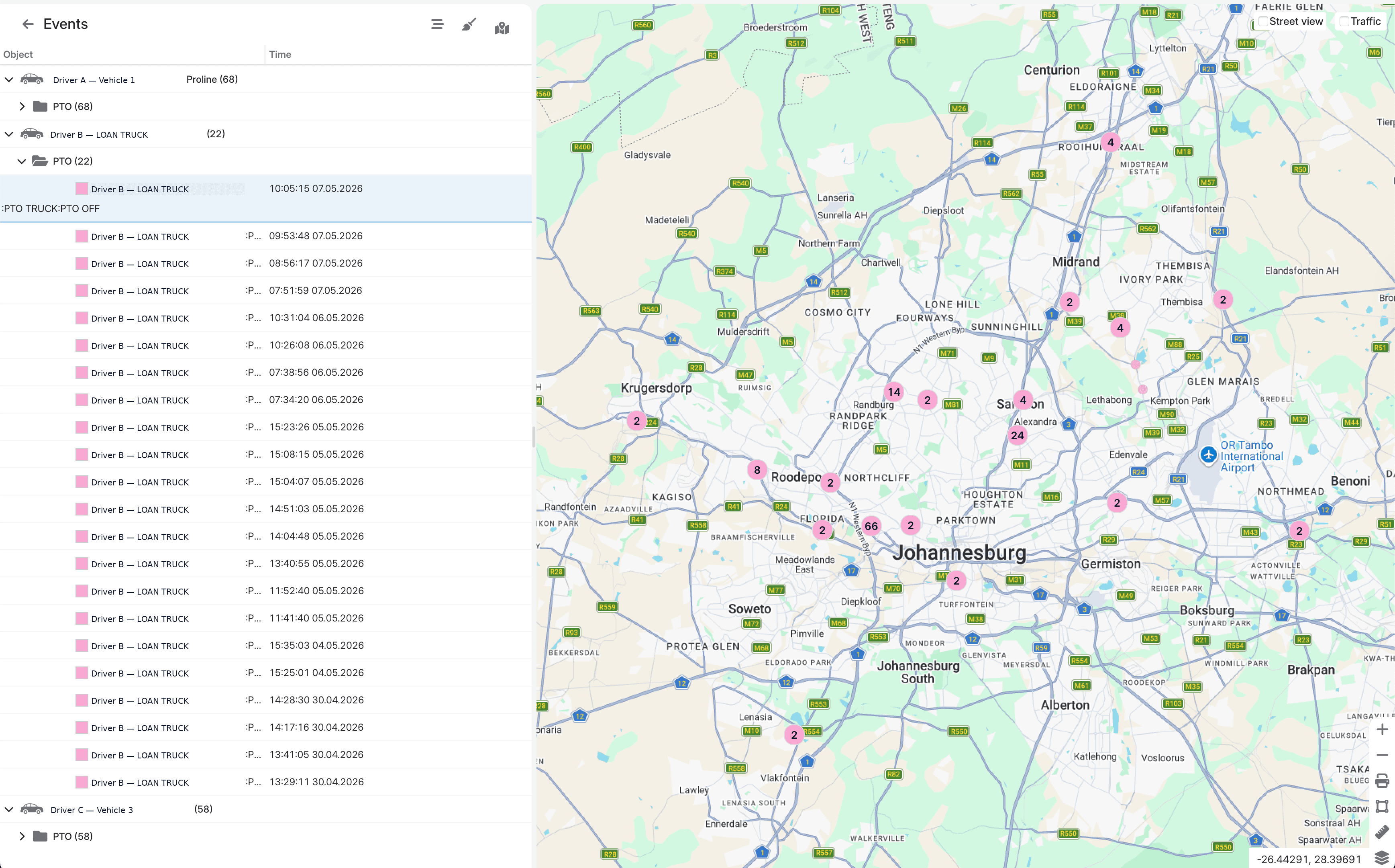
PTO events, mapped and searchable
Anonymised ACM Destiny view showing equipment events by vehicle, time and location.
Visual recovery evidence
A light roadside unit may only need an AI dashcam. A rollback or heavy recovery truck benefits from MDVR views covering the deck, winch, sides and rear as well as the road and driver.
Forward and driver-facing evidence for roadside response, driving risk, fatigue, phone use and incident review.
Four to twelve channels for road, driver, loading deck, winch, side, boom and rear views, with a hardened onboard archive.
Open a live view when an event needs intervention, then retrieve the relevant footage for claims, complaints or operator coaching.
Match the fitment to the truck
We survey the truck and the job workflow before specifying inputs, cameras and communications. One generic kit does not suit every wheel-lift, rollback, wrecker or rotator.
Roadside & light duty
Prioritise fast dispatch, driver safety and road-facing evidence for high-volume breakdown and accident response.
Rollback & flatbed
Connect the route, PTO-powered deck or winch activity and rear loading view into one defensible job record.
Heavy recovery
Use professional hardware, multiple equipment inputs and MDVR coverage for expensive, complex recovery operations.
Do not stop the record at the yard gate.
Yard geofences, vehicle arrival and departure events, camera footage and the dispatch reference help preserve the custody trail until release or onward delivery.
Live telematics streaming
Established towing businesses often already run specialist dispatch, insurer-panel, job, yard or invoicing software. ACM Destiny can act as the live telematics layer behind that system. A secure SSE feed can keep its vehicle map moving in real time while controllers stay inside one familiar operational workflow.
Your operating systems
SSE location feed
Stream continuous vehicle-location updates over a persistent HTTPS connection.
RabbitMQ event stream
Push broader telemetry and configured operational events as they happen.
REST API
Pull vehicles, trips, events, reports and available evidence on demand.
Authentication, SSE connection handling, field mapping, job-reference matching, event subscriptions and retention requirements are defined during integration scoping.
Make the data operational
We start with the jobs, trucks and dispatch statuses, then define which signals and camera views are needed. That avoids a technically working sensor that does not answer the operational question.
Document dispatch references, truck classes, SLA timestamps, pickup evidence, destinations and yard handovers.
Identify the PTO signal, hydraulic functions, available inputs, camera positions and power requirements.
Verify that each event represents the intended function and that every camera covers the required working area.
Use SSE, REST or RabbitMQ where appropriate, configure useful alerts and give controllers and managers the right views.
Build the recovery stack
Start with live fleet visibility, then add the PTO inputs and camera coverage required by that truck's recovery role.
Fleet operations
/vehicle/month · ex VAT
Live tracking, history, driver behaviour and operational reporting.
Road & driver view
/vehicle/month · ex VAT
For light-duty and roadside-response units.
Recovery visibility
/vehicle/month · ex VAT
For rollbacks, wreckers and heavy-recovery units.
Equipment inputs
per truck after survey
Input design and installation depend on the recovery equipment.
Keep your existing tow-management system.
Stream live locations over SSE, subscribe to broader RabbitMQ telemetry, or pull trips, events and reports through the REST API.
Build the right tow-fleet stack
Show us the truck types, PTO and hydraulic controls, dispatch workflow, insurer requirements and evidence gaps. We'll scope the tracking, inputs, cameras and integrations around the real operation.